
Tick what arrived
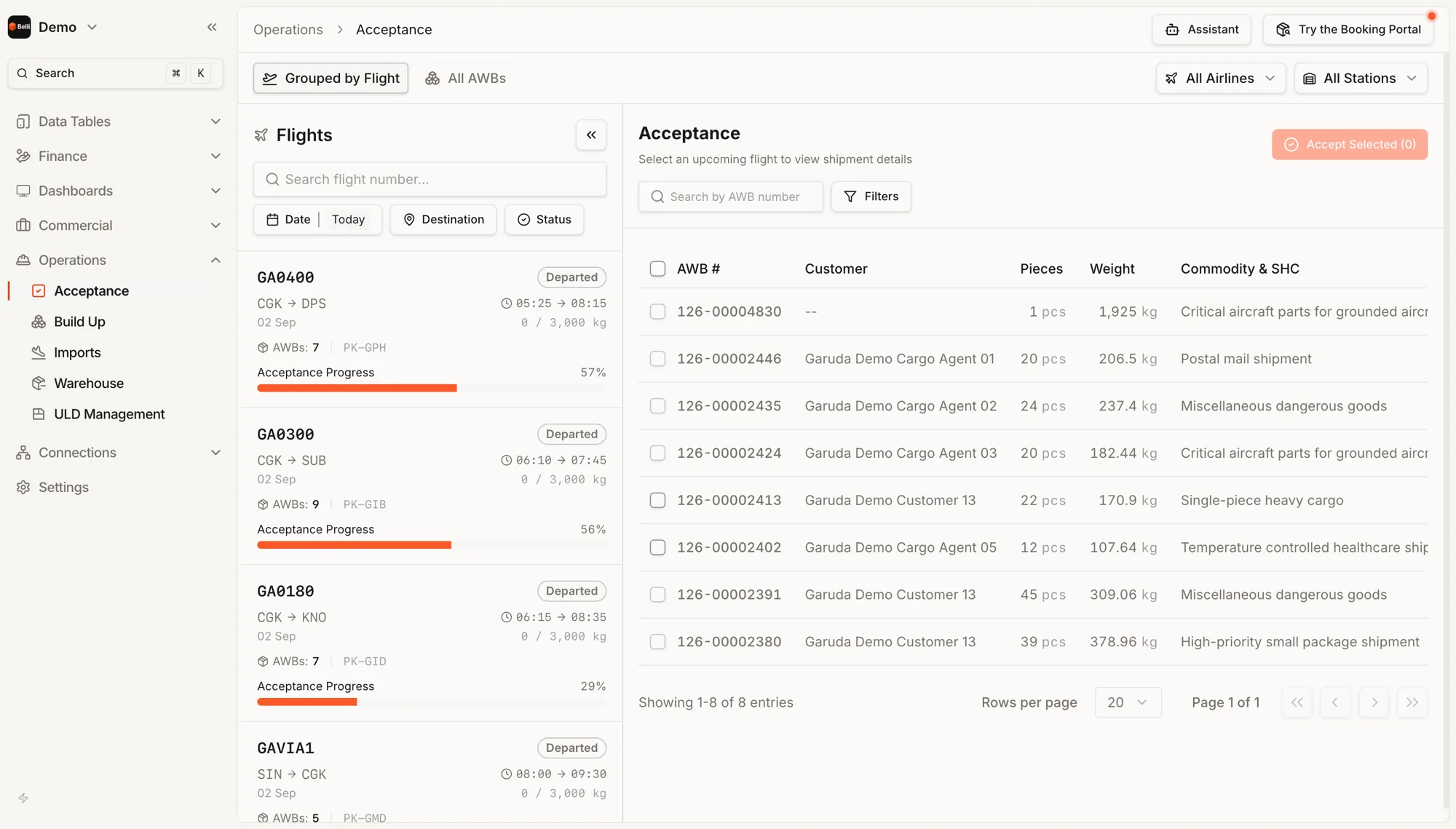
Flights on one side with how far acceptance has progressed, the waiting shipments on the other.
Progress
Every flight shows how much of its cargo has been accepted, as a bar and a percentage.
Accept in bulk
Tick the waybills that have physically turned up and accept them in one action.
Special handling
Commodity and special handling sit on the row: dangerous goods, temperature-controlled healthcare, single-piece heavy cargo, postal mail, critical aircraft parts.
By flight or across all waybills
Grouped by flight is the shift view. All AWBs is for when an agent calls about one shipment and nobody knows which flight it went on.
Scope
A handler running several carriers at one station, or one carrier across many stations, narrows the screen.
Also in Operations
Build UpThe lying list on one side, the ULDs on the other and drag between them. A waybill can be split across containers.ImportsImport the FFM or record it manually, then confirm what arrived.WarehouseWhat is lying on the floor, what came off a flight and needs replanning and what was rejected.Terminal ChargesA charge sheet per air waybill, with storage that counts itself and payment taken at the counter.ULD ManagementTyped inventory by location, with movements recorded where they happen.
See Acceptance in the live demo. Opens in a new tab.
Demo